
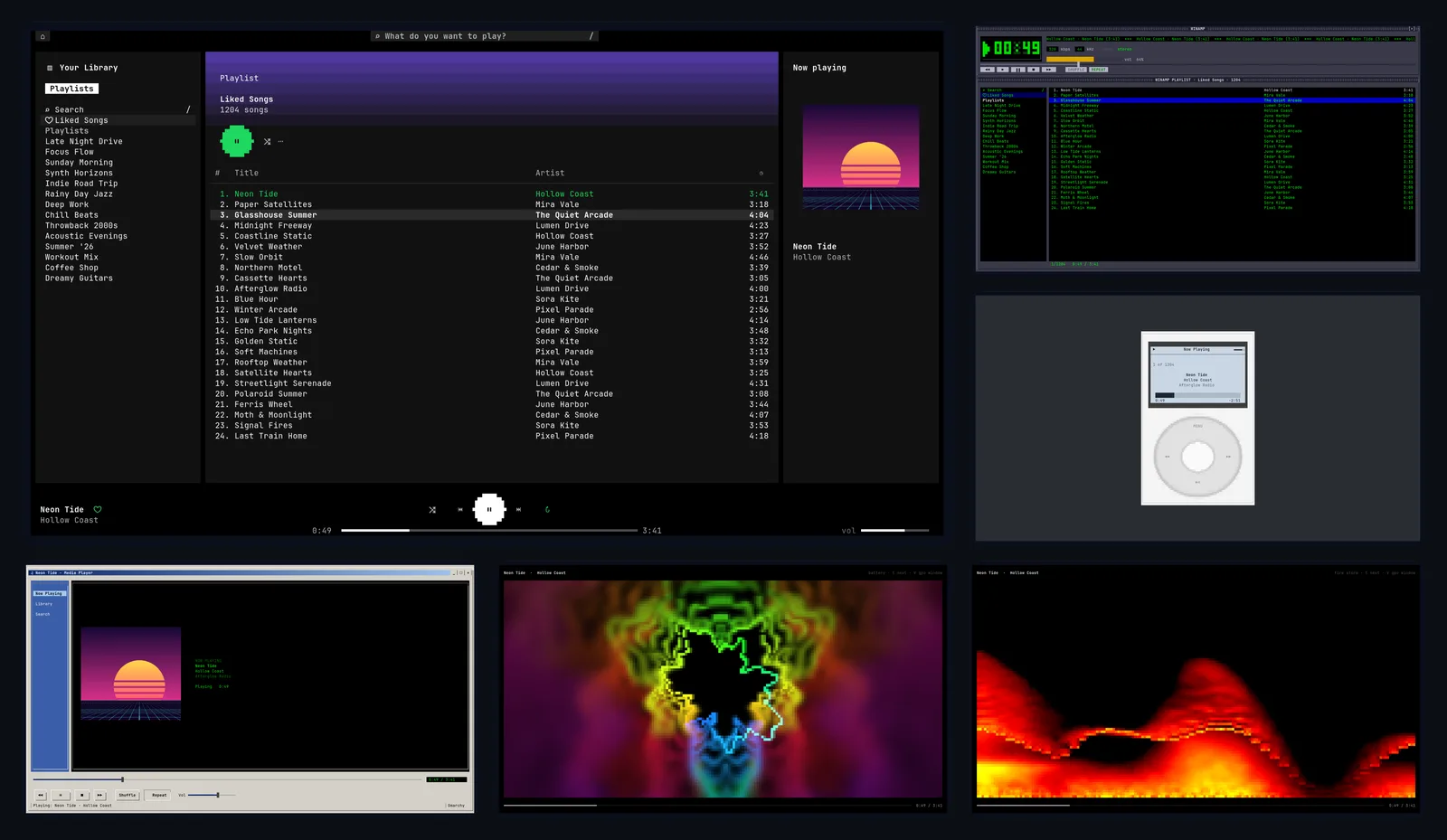
I miss the Windows Media Player visualizers. Anyone who used a PC in the 2000s knows the ones: Alchemy, Battery, the bars pulsing along to whatever you had on. They were pointless and they were great. When I'm coding I usually have music on and a terminal open, and I wanted something like that sitting in the corner of the screen again.
I run Omarchy, an Arch Linux setup built around Hyprland, on a Mac mini under Asahi Linux. That turned out to be the real problem. Before I could have visualizers, I needed a Spotify player that worked at all. So I built Skinamp.
What it does
Skinamp puts a music icon in your Omarchy bar. Hover over it and a mini player shows the cover, progress, the current lyric line, and controls for play, skip, shuffle, repeat and like. Click it and the full player opens.
The full player is a terminal app with eleven looks. Press t to step through them:
- Your Omarchy theme, and one modeled on today's Spotify app
- Winamp, iTunes and a click-wheel iPod
- Zune, and Windows Media Player 11 and 2000
- A lyrics skin that follows the song, with the current line highlighted
After the skins come the visualizers, which were the whole point. There are seven terminal styles modeled on WMP's, including bars, scope, fire storm, alchemy and battery, plus five GPU shaders drawn at full resolution. They react to the actual audio, not a fake animation. If you know a little WGSL you can write your own: drop a shader file in the config folder and it shows up in the rotation, reloading each time you save.
Why most Spotify players don't work on a Mac
Omarchy on Apple Silicon is an ARM machine, and most of the Spotify ecosystem on Linux assumes x86:
- Spotify's official Linux app has no ARM build.
- The Spotify web player needs a DRM component (Widevine) that also isn't available there.
- Omarchy's own music shortcut falls through to an installer that can't work on ARM.
- Most of the Spotify plugins for Omarchy build on the official app, or on tools you install separately that often aren't packaged for ARM.
My first attempt was glue. I set up ncspot, a terminal Spotify client, which meant building it from source and patching it so the media keys and the bar controls worked. Then I switched to another client, spotify-player, which ran as a background service with a mini player in the bar. It worked, but I was wrapping someone else's program in shell scripts, and every feature I wanted ran into the edges of what it exposed. I couldn't get at the audio for visualizers, I couldn't control how fast it responded, and I couldn't skin it the way I wanted.
So I started over in Rust, on the same foundation those players use underneath.
How I built it
Plan first
Before writing any code, I wrote a design document: every major decision with the reasoning behind it, the architecture, and milestones with acceptance criteria. A few of the decisions that shaped everything else:
- One background process owns everything. A single daemon handles the Spotify session, audio, media keys and notifications. The bar icon, the terminal player and the visualizer window are thin clients that talk to it over a local socket. That's why an update, or a crash in the UI, never stops the song.
- No network calls for playback. Play, pause and skip go straight to the local player and never touch Spotify's web API. The web API has rate limits, and other plugins' users kept hitting them.
- Audio through PipeWire, never raw ALSA. On Apple Silicon, the speakers depend on a tuned processing chain that raw ALSA would bypass.
Prove the hardest part first
The first milestone was a spike with one job: prove the core works on the Mac, measured against numbers I set in advance. Asahi has quirks x86 Linux doesn't. For example, its kernel uses 16 KB memory pages instead of 4 KB, which crashes some popular memory allocators, so I avoided them from the start.
I measured everything: CPU while paused (zero), CPU while playing (about 1% of one core), memory, and how long each command takes to show up as an event. Two results needed work.
Memory. The first version used 47 MB while playing. About 20 MB of that was glibc's allocator keeping a separate memory pool for each thread. Capping it at two pools, and running two worker threads instead of one per CPU core, brought it to 25 MB with no change in latency.
Pause. My target was a pause that goes quiet within 100 ms. With the standard audio output it took about 200 ms, because stopping waited for all buffered audio to play out first. That's long enough to feel. I wrote a custom audio output that drops the buffer instead of draining it, and made pause, skip and seek interrupt a write already in progress. Typical pause dropped to under 30 ms.
Learn from the competition's bug reports
Before building the player UI, I went through the other Spotify plugins on the Omarchy marketplace and read their issue trackers. The most popular one had 108 issues in six weeks, and they clustered: installs that broke after an Omarchy update, playback that stopped after a reconnect, one shared Spotify app ID so every user hit the same rate limit, and settings that reset every restart. I turned that list into requirements. Skinamp's installer doesn't depend on shell internals that change between versions. The session supervises and restarts itself. Your settings live in your own config files.
Then make it fun
With the core solid, I built the skins and visualizers. Each skin is a layout over the same library, playlist and search views, so adding one doesn't mean rewriting the player. I tested them with a demo mode that plays made-up music without signing in. That made a screenshot audit of every skin easy, and it's also how anyone can try Skinamp without an account.
Ship it properly
Getting listed on the Omarchy plugin marketplace meant a review, and the reviewer was thorough, in a good way. The installer now:
- Downloads prebuilt binaries only if they match a checksum pinned in the plugin itself, and the release builds come with GitHub build attestations
- Installs everything in your home folder, with no
sudo - Records every file it puts in place, and never overwrites or deletes a file it didn't put there
GitHub Actions builds releases for both x86_64 and ARM, so Skinamp works on regular PCs too, not just Macs.
By the numbers
- About 15,000 lines of Rust across four crates
- 27 MB for the background player, 20 MB for the player window
- Pause in under 30 ms, down from about 200 ms
- Zero network calls to play, pause or skip
- From the first Rust commit to a marketplace listing in three days
Standing on someone else's work
The hard part of any third-party Spotify player is talking to Spotify at all, and I didn't write that. Skinamp is built on librespot, the open-source Spotify Connect library. Without it, this project doesn't exist. Synced lyrics come from LRCLIB, an open lyrics database. And the skins are love letters to software that Nullsoft, Apple and Microsoft shipped twenty years ago.
What it doesn't do (yet)
It needs Spotify Premium. That's Spotify's rule for every third-party player, not mine. There's no podcast or audiobook support, and the full-resolution visualizers need a terminal that can show images. Foot, Omarchy's default terminal, can.
Try it
If you run Omarchy, on a Mac or a PC:
omarchy plugin add https://github.com/idrewlong/skinamp --enableThen hover over the music icon and click Set up. If you want to look around first, skinamp tui --demo opens the player with made-up music, no account needed. Press t and flip through the skins until you reach the visualizers.
The code is on GitHub. If you make a visualizer, I'd genuinely love to see it.