
It’s Monday morning, I’ve just finished my coffee, and a client asks a simple question: why did traffic drop this month? Answering it means an hour of digging. GA4 first: compare this month with the month before, break it down by channel, source and campaign, and work out which numbers actually moved.
If organic search fell, Search Console is next: was it impressions, rankings or click-through, which pages and queries lost the most, and was it searches for the brand name or everything else? Then the usual suspects: a Google update, pages dropping out of the index, or broken tracking if Search Console looks flat while GA4 fell. Every answer lives in a different tool, so most of the hour goes to collecting them.
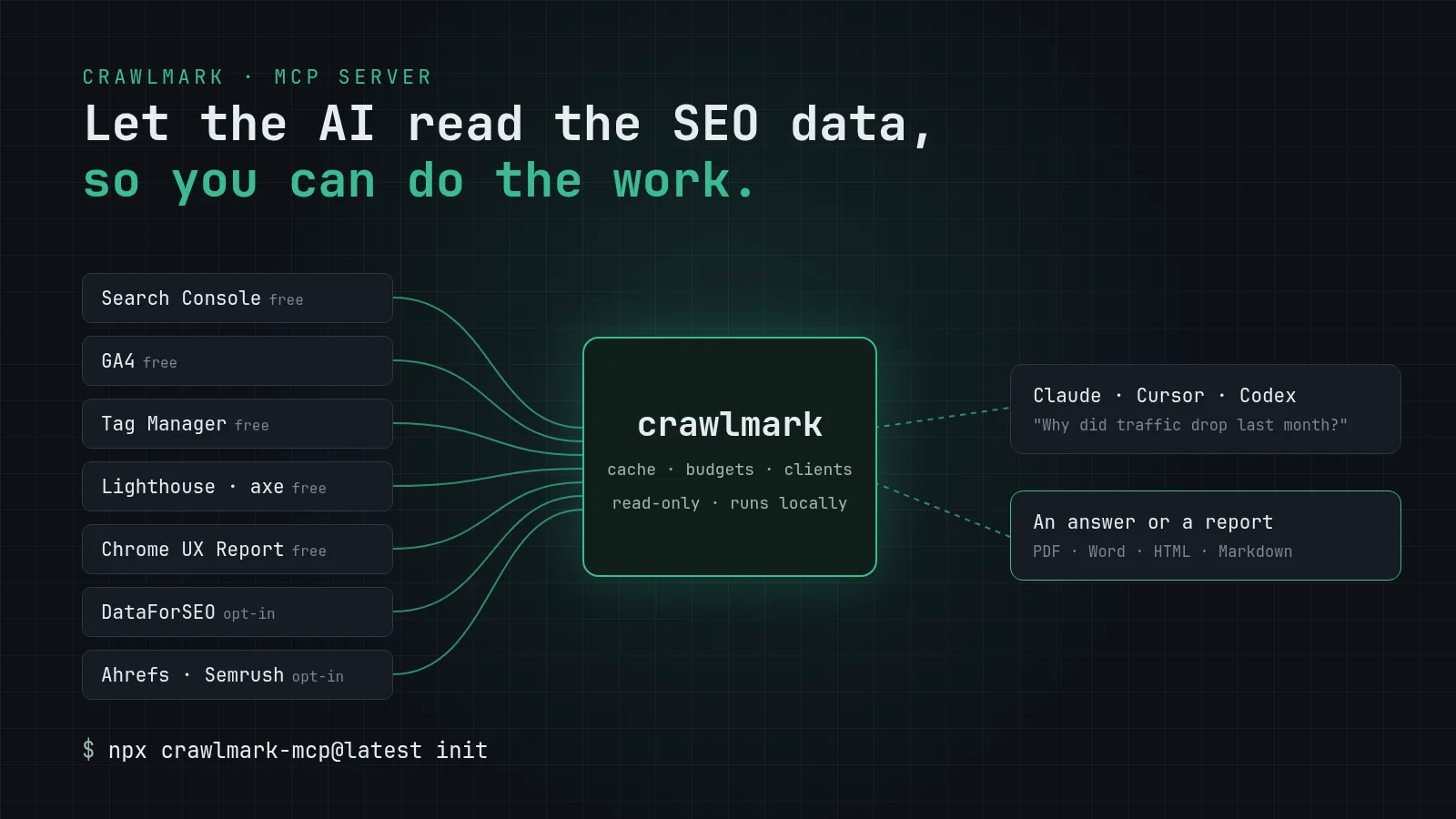
AI models are good at reading data and explaining it. They just need the data. So I built crawlmark, an MCP server that gives Claude (and Cursor and Codex) access to the data I’d otherwise collect manually. On top of that, it runs audits, finds opportunities, tracks rankings, checks indexing and builds branded client reports. I ask the question in plain language, crawlmark does the digging, and Claude writes the answer.
Why I built it
Client questions rarely fit a dashboard. Take this one: “Which pages lost non-branded clicks after the redesign, and was it rankings or click-through?” Answering it means pulling Search Console data for the weeks before and after the launch, filtering out searches for the brand name, and comparing position and click-through rate page by page. For me, that’s a pile of exports and a spreadsheet. For a model with the right tools, it’s one question.
A few things weren't up for negotiation:
- Your data stays on your machine. Credentials live in a local
.env, the cache is a local SQLite file, and nothing is sent to me. There's no tracking. - Read-only on Google. crawlmark asks for read-only scopes and never writes to Search Console, GA4 or Tag Manager.
- Hard spend caps on paid APIs. Every paid call is estimated first and checked against per-client and global monthly caps, so a curious question can't run up a bill.
- Free sources first. Search Console, GA4, Lighthouse, accessibility checks and a local crawler cost nothing. Paid data (DataForSEO, or your own Ahrefs or Semrush key) is opt-in and says what it costs.
Who it's for
- People looking after their own site who want answers without learning five tools.
- In-house marketing teams who produce the same report every month and field "what happened?" questions in between.
- Agencies and consultants with many clients. crawlmark discovers clients from your Search Console and GA4 accounts, keeps one profile per client, and runs the same report or audit across all of them.
The common thread: less time collecting data, more time on the work people actually pay for.
How it works
crawlmark is an MCP server, a small program that runs next to your AI app and gives it tools. When you ask Claude a question, Claude decides which tools to call. crawlmark fetches the data from Google, your data provider, Lighthouse or your own server logs, caches it, checks it against your budget, and hands back clean numbers. Claude writes the answer, so the tone and format stay in your hands.
Three decisions shaped most of the code:
Estimates before spending. Every paid tool can return an estimate without making the call, and a whole report reserves its budget before it starts. Parallel calls can't sneak past the cap, which turned out to matter: a model will happily fire ten requests at once.
Untrusted text stays untrusted. An SEO tool reads web pages, and web pages can contain text written to manipulate an AI. crawlmark treats crawled text as data, strips control characters before anything reaches a terminal or a report, and makes changes that matter, like saving a report template, go through an explicit confirmation step.
One client list, everywhere. Clients are discovered from Search Console and GA4 (Tag Manager containers are matched to them), stored in one file, and every tool takes the same client argument. "example.com" means the same site in a report, an audit and a crawl.
Features
Reports. Monthly, quarterly, executive (one page), technical and local SEO templates, exported as PDF, Word, HTML or Markdown with your agency name, logo and colors. The monthly report compares the month with the one before and with the same month last year, separates branded searches from non-branded ones, and notes what changed since the last audit. Claude writes the commentary next to the numbers. You can build your own template by picking sections, from the terminal or by asking Claude.
Opportunities. Queries sitting at positions 5 to 20, pages just off the first page of results, top-five queries with a weak click-through rate (title and meta rewrite candidates), pages competing for the same query, and pages losing clicks. Each comes with an estimate of the clicks at stake. Free, from Search Console.
Audits. Lighthouse scores, accessibility checks with axe, raw vs rendered HTML, structured data, sitemaps, robots.txt and hreflang for each key page. A free local crawl of up to 2,000 pages finds broken links, redirect chains, missing titles and orphan pages. Audits are saved, so the next one tells you what’s new, fixed or still open, and every source rolls up into one deduplicated list of technical issues.
Indexing. Which pages Google has indexed and why the others aren’t, from the free URL Inspection API within a daily budget, plus an import of Search Console’s own Pages report for the full counts.
Rankings, keywords and competitors. Tracked keyword positions saved from Search Console for free, with optional live Google ranks and a history of the best, worst and latest position. With a paid data provider: keyword ideas and search volume, the keywords competitors rank for that you don’t, and competitor suggestions you approve before they’re saved.
Local SEO. The client’s Google Business Profile, its position in the Google Maps pack for tracked keywords, and its latest reviews, through DataForSEO. Paid and still in beta.
AI search. Whether AI crawlers such as GPTBot and ClaudeBot are allowed in robots.txt, and whether the site has an llms.txt file. As a paid opt-in, it also shows which questions in Google AI Overviews cite the client’s site.
Performance. Lab Core Web Vitals from Lighthouse, real-user data from PageSpeed Insights, and up to 40 weeks of Core Web Vitals history from the Chrome UX Report.
Server logs. What Googlebot, Bingbot and AI crawlers actually request, from your own access logs, with Googlebot checked against Google’s published IP ranges. The logs never leave your machine.
Tag Manager and Bing. An audit of the live Tag Manager container for paused, duplicate and unfired tags and consent gaps, plus Bing clicks, queries and crawl issues from Bing Webmaster Tools.
Getting started
npx crawlmark-mcp@latest init
The installer walks through Google (free), a data provider (optional, paid per call) and a PageSpeed key (optional), checks each one live, and registers crawlmark with Claude Code, Claude Desktop, Cursor and Codex. Claude Desktop users can also install a one-click bundle.
Then ask:
- "Give me the monthly report for example.com."
- "What are the quick wins for example.com?"
- "Audit example.com and tell me what changed since last time."
What it isn't
It isn't a replacement for your judgement or your SEO tools. It's a faster way to ask them questions. Estimated extra clicks are signals for prioritizing, not forecasts. Automated accessibility checks catch a lot but still need a manual review.
It's also early. The Ahrefs, Semrush and Bing integrations, Local SEO and AI-search visibility are built to the official docs but haven’t been fully checked against a live account yet, so they’re marked beta. It works with apps that run local MCP servers, which today means Claude, Cursor and Codex rather than ChatGPT.
Tell me what's missing
I want to hear about missing data sources, report formats you need, and anything rough in setup. Open an issue or a discussion on GitHub. Adding a data source is a documented, small change if you'd like to contribute one.
Install: npx crawlmark-mcp@latest init